
WPS Editor
Screen Overview
Purpose: Enter and maintain all technical WPS data
across nine tabs.
When to use: After creating or opening a WPS from the
list.
Locking rules:
- Approved / Superseded / Archived: Read-only; use
Create Revision to change. - Review (after first signature): Content locked
until all steps signed; edit invalidates signatures.
Editor tabs summary
| Tab | Purpose |
|---|---|
| General | Identification, norm, dates, master template flag |
| Material | Base materials, thickness ranges, groups |
| Technique | Processes, positions, joint types, heat treatment |
| Consumables | Filler wire, flux, gas, tungsten |
| Parameters | Amperage, voltage, travel speed, etc. per pass |
| Groove Design | Groove type, angles, root gap |
| Links & PQRs | Linked PQR and supporting documents |
| Approvals | Signatory steps and digital signatures |
| History | Audit trail of all changes |
5.1 General Tab (Draft)
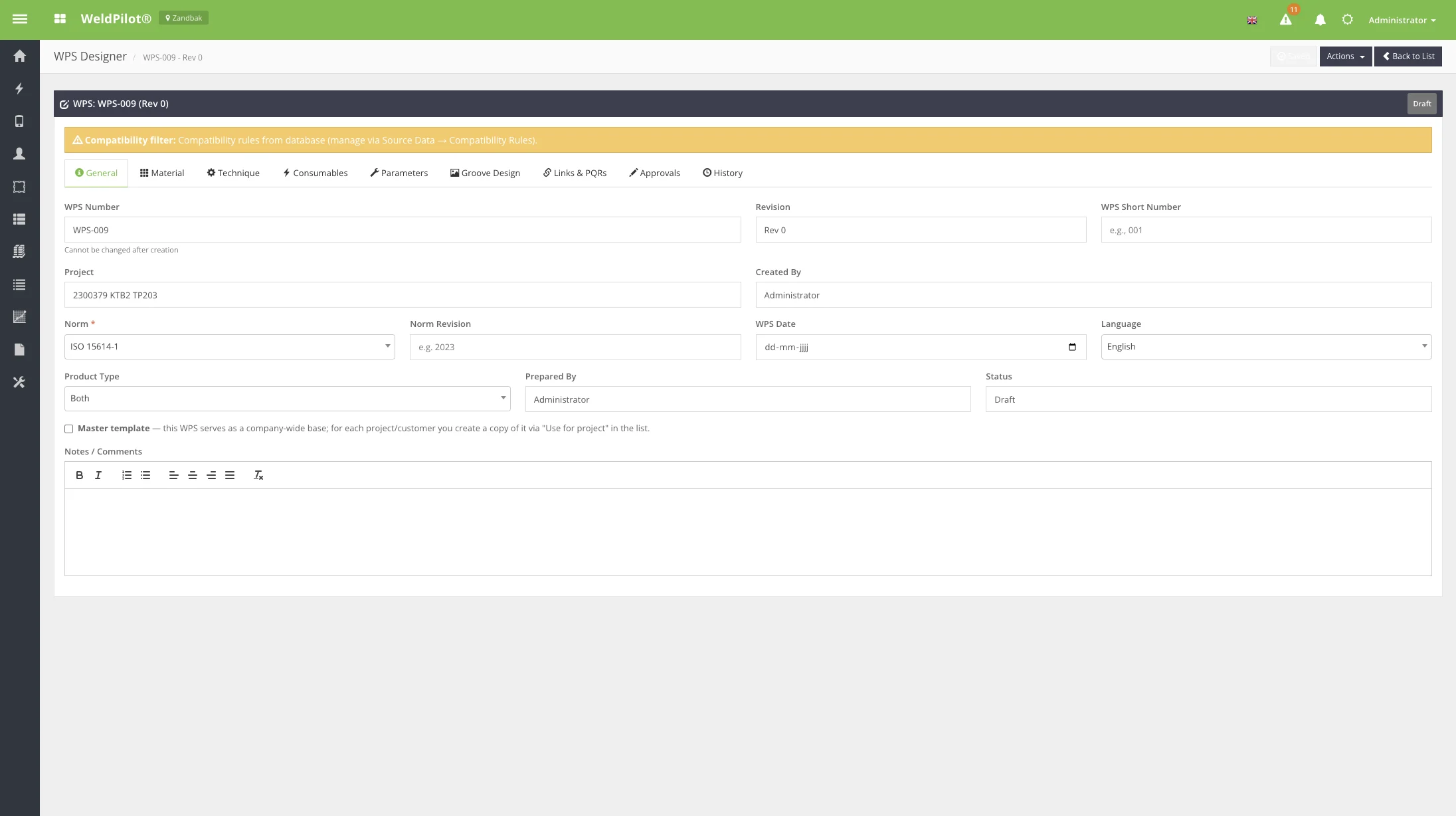
| Field | Description | Required |
|---|---|---|
| WPS Number | Fixed after creation | — |
| Revision | Current revision | — |
| WPS Short Number | Short reference | No |
| Project | Project site | Yes |
| Norm | e.g. ASME IX, EN ISO 15614 | Yes |
| WPS Date | Document date | Yes |
| Language | PDF/output language | Yes |
| Product Type | Pipe / Plate / Both | Yes |
| Prepared By | Author name | No |
| Master template | Mark as company-wide master | No |
| Notes | Free-text comments | No |
Master template checkbox: When checked on an
approved WPS, it becomes eligible for Use for project
copies.
5.2 Material Tab
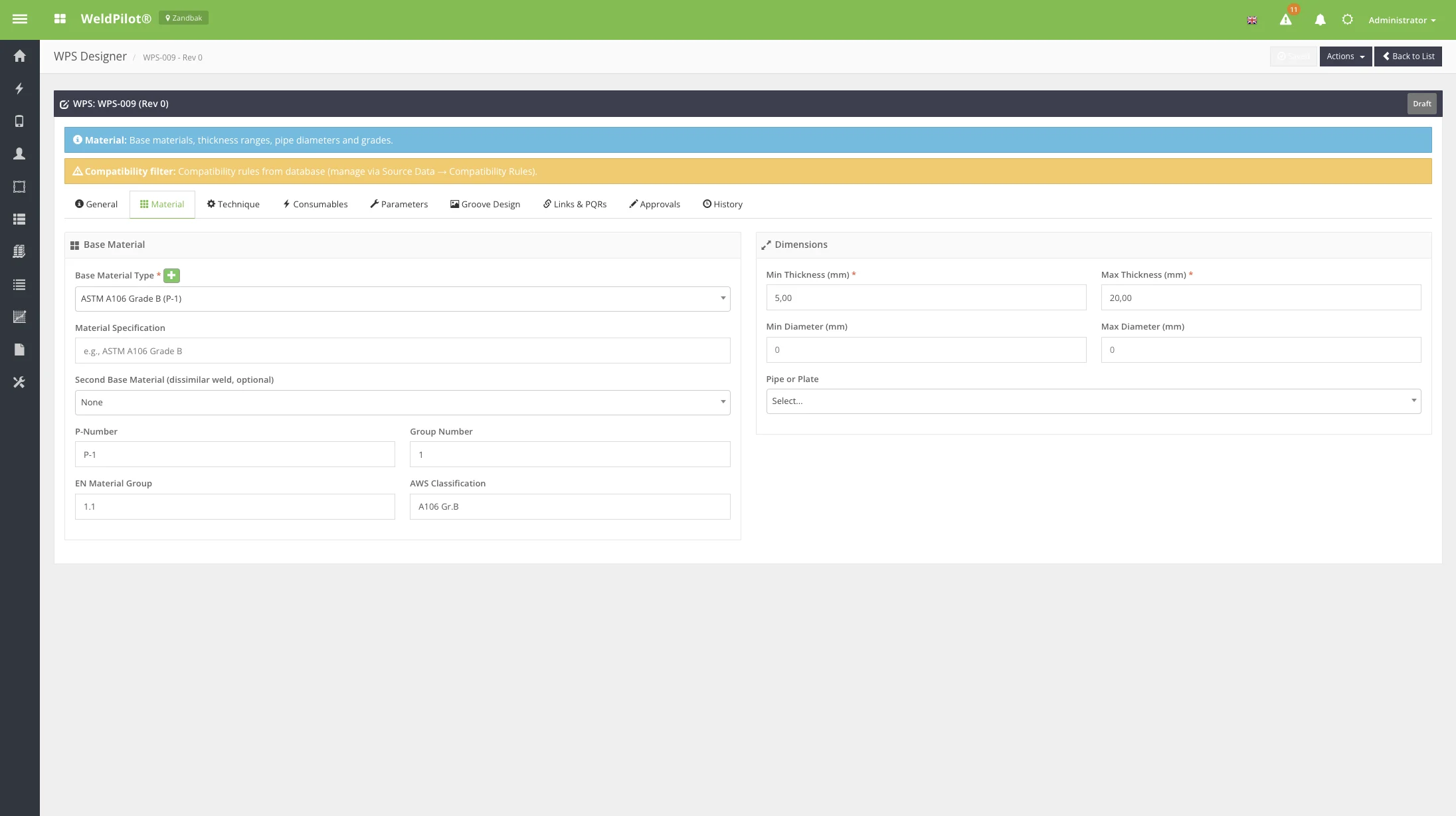
Define base material(s), material groups, thickness and diameter
ranges. Dropdown values come from Source Data →
Materials and compatibility rules may restrict choices.
5.3 Technique Tab

Configure welding process(es), positions, joint types, preheat,
interpass, and PWHT requirements.
5.4 Consumables Tab
Select filler materials, shielding gas, backing gas, and tungsten
types from source data lists.
5.5 Parameters Tab
Enter welding parameters per pass/run (current, voltage, travel
speed, wire feed, etc.).
5.6 Groove Design Tab
Document groove preparation, angles, root face, and spacing.
5.7 Links & PQRs Tab
Link supporting PQR records and upload/reference related
documents.
5.8 Approvals Tab (Draft setup)
Define approval steps (manufacturer, customer, third party) before
submitting for review.
5.9 History Tab
Shows chronological audit entries: creation, field changes, status
transitions, signature events.
5.10 Review Status
When status is Review, a content-lock banner appears
after the first signature. Complete remaining approval steps on the
Approvals tab.
| Action | Description |
|---|---|
| Save Draft | Not available when content locked |
| Submit for Review | Move draft → review (requires validation) |
| Final Approve WPS | Available when all steps signed |
| PDF Export | Preview or download templates |
5.11 Approved (Read-Only)
Approved WPS displays:
- Green Approved badge
- Yellow Locked banner — read-only; create revision
to change - Actions → PDF Export for preview/download
- View PDF from list (official signed document when
generated)
Top bar controls
| Control | Description |
|---|---|
| Saved indicator | Auto-save status |
| Actions | Save, clone, template, review, approve, PDF, revision, archive |
| Back to List | Return to WPS list |